
Modern privacy isn’t usually lost in one catastrophic mistake.
It’s lost one small decision at a time.
One new app.
One browser extension.
One cloud account.
One shared folder.
One forgotten API key.
One old phone sitting in a drawer.
Individually, none of these seem dangerous.
Together, they become a maze that even you no longer understand.
That’s why:
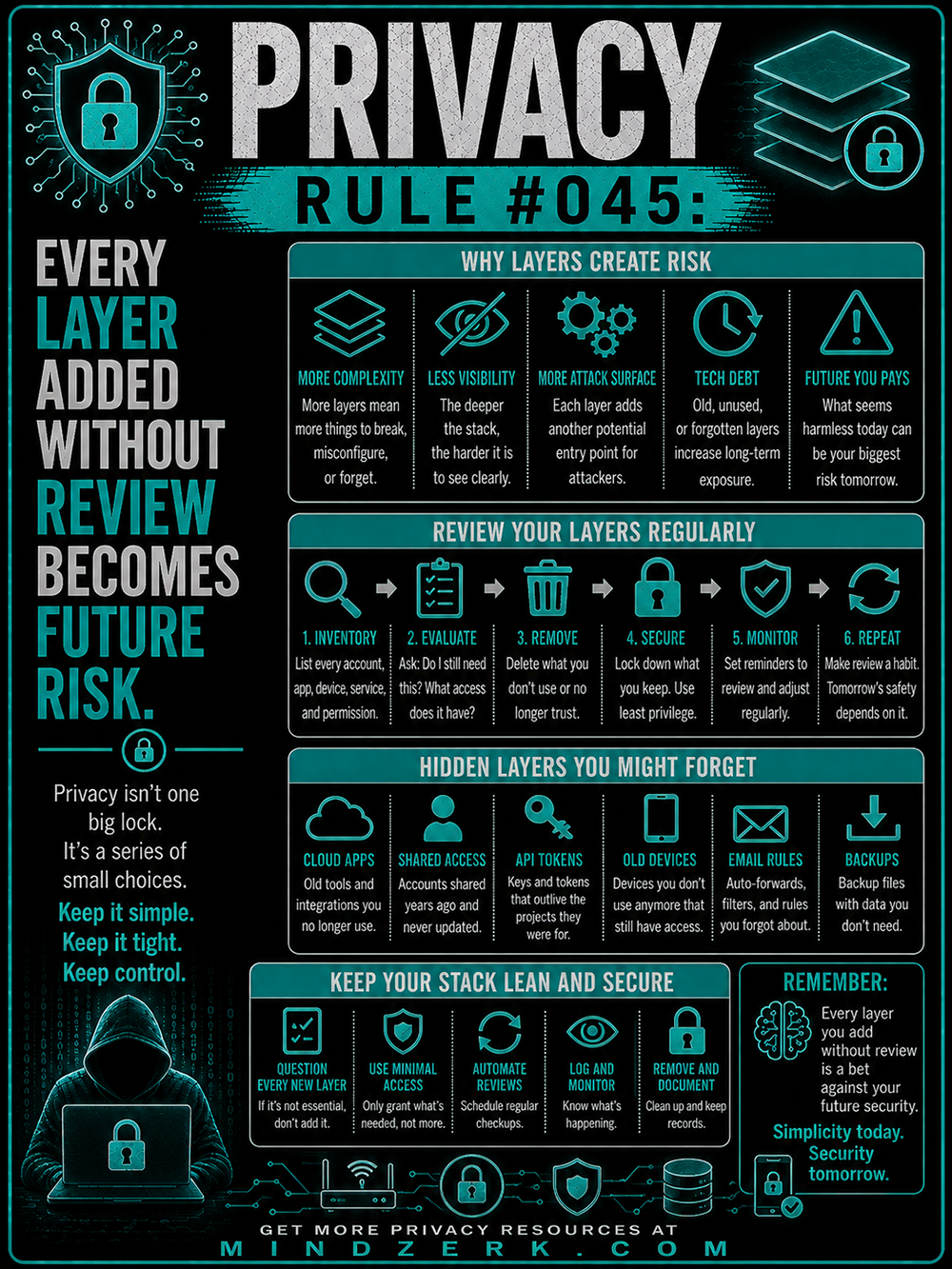
Privacy Rule #045: Every Layer Added Without Review Becomes Future Risk.
Privacy isn’t protected by building endlessly.
It’s protected by building intentionally—and regularly removing what you no longer need.
Why More Layers Create More Risk
As our digital lives grow, so does their complexity.
Every service we sign up for, every permission we grant, and every integration we enable adds another piece to our personal technology stack.
Each layer may solve a problem today.
But every layer also becomes something that must be maintained tomorrow.
The safest systems aren’t necessarily the biggest.
They’re the ones that remain understandable.
More Complexity Means More Things Can Break
Every account introduces:
- Another password
- Another recovery email
- Another privacy policy
- Another permissions list
- Another possible breach
Eventually it becomes impossible to remember what you’ve connected to what.
Complexity itself becomes the vulnerability.
Simple systems are easier to secure because there are fewer moving parts.
Less Visibility Creates Blind Spots
The deeper your digital stack becomes, the harder it is to see the whole picture.
You might remember installing an application three years ago.
You probably don’t remember:
- What permissions it still has
- Whether it’s still syncing data
- Who can access it
- Whether it’s still receiving updates
Unknown access is rarely intentional.
It’s usually forgotten.
And forgotten access is exactly what attackers hope to find.
Every Layer Expands Your Attack Surface
Cybersecurity professionals often talk about “attack surface.”
It’s simply the number of possible ways someone could gain access to your information.
Every added service increases that surface.
Examples include:
- Cloud storage accounts
- Smart home devices
- Browser extensions
- API integrations
- Password sharing
- Third-party logins
- Collaboration tools
None are inherently dangerous.
But each one becomes another doorway that needs attention.
Tech Debt Isn’t Just for Software
Developers use the term technical debt to describe shortcuts that create bigger problems later.
Privacy has the same issue.
Old accounts.
Unused software.
Expired projects.
Forgotten integrations.
Temporary permissions that became permanent.
All of these accumulate over time.
Eventually you’re spending more effort maintaining old decisions than making good new ones.
Future You Pays the Price
Convenience almost always wins in the moment.
“Just allow access.”
“I’ll remove it later.”
“I’ll clean this up someday.”
Most people never do.
Months become years.
By then you’ve forgotten the decision completely.
The risk remains long after the convenience disappears.
Review Your Layers Regularly
Privacy isn’t something you set once.
It’s something you maintain.
Think of it like changing the batteries in your smoke detectors or servicing your vehicle.
Small routine maintenance prevents much larger problems.
Here’s a simple review process.
1. Inventory Everything
Start by listing:
- Email accounts
- Cloud services
- Apps
- Devices
- Browser extensions
- Shared folders
- Password managers
- Connected services
- API keys and tokens
You can’t secure what you don’t know exists.
2. Evaluate Each Layer
Ask simple questions:
- Do I still use this?
- Does it still solve a problem?
- What data can it access?
- What happens if it’s compromised?
If the answer isn’t clear, it’s worth investigating.
3. Remove What You Don’t Need
Delete:
- Old services
- Trial accounts
- Unused integrations
- Duplicate cloud storage
- Outdated software
- Forgotten permissions
Every layer removed is one less thing to monitor.
4. Secure What Remains
For the services you keep:
- Enable multi-factor authentication.
- Use unique passwords.
- Reduce permissions to the minimum necessary.
- Update recovery information.
- Review sharing settings.
Security isn’t about locking everything down.
It’s about giving each service only the access it actually needs.
5. Monitor Regularly
Set a recurring reminder every few months to review your accounts.
Small, frequent reviews are far easier than trying to untangle years of digital clutter all at once.
6. Repeat
Privacy is never finished.
Technology changes.
Your work changes.
Your habits change.
Your digital environment should evolve with them.
Hidden Layers You May Forget
Some of the biggest privacy risks aren’t obvious.
Cloud Applications
Old cloud tools often remain connected long after you stop using them.
Many still have access to your files or email.
Shared Access
Maybe you shared a folder with a contractor years ago.
Perhaps a former employee still has access to company documents.
Shared permissions deserve regular review.
API Tokens
Developers frequently generate API keys and never revoke them.
Those keys may continue working long after the project has ended.
Treat API tokens like passwords.
Delete unused ones.
Old Devices
An old phone, tablet, or laptop may still be signed into your accounts.
If you no longer use it, remove it from your trusted devices list or securely wipe it.
Email Rules
Automatic forwarding rules, filters, and inbox automations often survive for years.
Review them occasionally to make sure they still serve a purpose.
Backups
Backups are important.
Unnecessary backups aren’t.
Old archives may contain sensitive information you no longer need to retain.
Know what you’re storing—and why.
Keep Your Stack Lean and Secure
A good privacy habit is simple:
Before adding anything new, ask whether it’s truly necessary.
Question Every New Layer
Not every new app improves your life.
Not every browser extension deserves installation.
Not every integration is worth the additional complexity.
If it isn’t essential, don’t add it.
Use Minimal Access
When an app requests permissions, grant only what’s required.
Most services ask for more than they truly need.
The principle of least privilege protects both your privacy and your future.
Automate Reviews
Calendar reminders, password managers, and security dashboards can help you regularly audit your digital footprint.
Routine maintenance is easier than emergency cleanup.
Log and Monitor
Know which services are connected to your accounts.
Pay attention to login notifications and unusual activity.
Visibility is one of your strongest security tools.
Remove and Document
When you delete a service, make sure you’ve also removed connected accounts, permissions, and backup copies where appropriate.
Keeping simple records of your important accounts can make future audits much easier.
Simplicity Is a Security Strategy
People often think privacy comes from buying more security software.
Sometimes it does.
But often, better privacy comes from owning fewer unnecessary digital layers in the first place.
Every account.
Every integration.
Every permission.
Every connected device.
Every one of them is a promise that you’ll continue managing it responsibly.
If you won’t maintain it, don’t keep it.
Because every layer you add without review is a bet against your future security.
Build a digital life that’s easy to understand, easy to maintain, and easy to protect.
Keep it simple.
Keep it tight.
Keep it under your control.
Because today’s simplicity becomes tomorrow’s security.